批量修改错误数据

问题

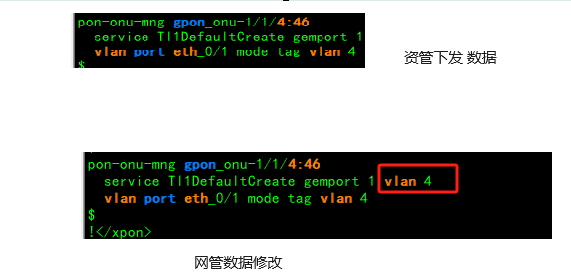
割接时资管平台下发的网管数据,ONT配置缺少部分字段,会导致中兴C600 OLT上SFU设备用户mac起不来,无法正常上网引起投诉。

下发的ONT数据

 1
 2
 3
 4
 5
 6
 7
 8
 9
10
11
12
13
14
15
16
17
NH_ZongHeLou4_C600(config)#show running-config-interface  gpon_onu-1/1/8:16
!<if-intf>
interface gpon_onu-1/1/8:16
$
!</if-intf>
!<xpon>
interface gpon_onu-1/1/8:16
  name ********
  tcont 1 name Tl1DefaultCreate allocid 1783 profile 100M-UP
  sn-bind disable
  gemport 1 name Tl1DefaultCreate portid 1032 tcont 1
$
pon-onu-mng gpon_onu-1/1/8:16
  service Tl1DefaultCreate gemport 1
  vlan port eth_0/1 mode tag vlan 4
$
!</xpon>

其中service Tl1DefaultCreate gemport 1缺少了vlan4

修改

需先进入端口删除原有配置后,配置新的数据。

1
2
3
4
pon-onu-mng gpon_onu-1/1/8:16
  no service Tl1DefaultCreate
  service Tl1DefaultCreate gemport 1 vlan 4
  !

修改后的ONT配置

1
2
3
4
5
NH_ZongHeLou4_C600(config)#show running-config-in gpon_onu-1/1/8:16
....省略
pon-onu-mng gpon_onu-1/1/8:16
  service Tl1DefaultCreate gemport 1 vlan 4
  vlan port eth_0/1 mode tag vlan 4

修改后SFU设备能正常获取到MAC,正常上网。 alt text

利用Python批量修改

通过Python自动识别割接表中C600 PON口及PON口下的SFU设备的id,批量生成修改脚本。

逻辑

登录OLT后通过show running-config-interface gpon_olt-x/x/x命令列出所有PON口下ont设备。 其中使用GENERAL1FE模板的都是SFU设备,提取其ONT ID后批量生成修改脚本。

show running-config-interface gpon_olt-1/1/8

 1
 2
 3
 4
 5
 6
 7
 8
 9
10
11
12
13
14
15
16
17
18
19
20
21
22
23
24
25
26
27
28
CX_ZhangQiWanQiao3_C600(config)#show running-config-interface  gpon_olt-1/1/8
!<if-intf>
interface gpon_olt-1/1/8
$
!</if-intf>
!<xpon>
interface gpon_olt-1/1/8
  onu 1 type iHGU1G3F1P2W pw k0170880gc
  onu 2 type iHGU1G3F1P2W pw k068291616
  onu 3 type GENERAL1FE pw 7526459qwc
  onu 4 type iHGU1G3F1P2W pw n772099322
  onu 5 type iHGU1G3F1P2W pw v0058831ak
  onu 6 type iHGU1G3F1P2W pw t4201806nb
  onu 7 type iHGU1G3F1P2W pw s7110294r1
  onu 8 type iHGU1G3F1P2W pw s0383435np
  onu 9 type iHGU1G3F1P2W pw s355464371
  onu 10 type iHGU1G3F1P2W pw t8362730ky
  onu 11 type iHGU1G3F1P2W pw r549522394
  onu 12 type GENERAL1FE pw a56759276a
...省略
  resource-id-assign-mode mode2
$
!</xpon>
!<MSAN>
interface gpon_olt-1/1/8
  no shutdown
$
!</MSAN>

python脚本

识别割接表中C600的PON口

割接表

原olt端口 老olt名称 老端口 新olt端口 新olt名称 新端口 拨号vlan 新703内层 HGU管理 组播vlan
宁波市慈溪区掌起工业区2汇聚机房-OLT45-00-02-GPBD-PON2 宁波市慈溪区掌起工业区2汇聚机房-OLT45 0/2/2 宁波市慈溪市掌起万安桥节点-3-OLT289-ZTE-C600-1-1-GFBT-XGPON融合4 宁波市慈溪市掌起万安桥节点-3-OLT289-ZTE-C600 1/1/4 1111 3333 333 2222
宁波市慈溪区掌起工业区2汇聚机房-OLT45-00-02-GPBD-PON3 宁波市慈溪区掌起工业区2汇聚机房-OLT45 0/2/3 宁波市慈溪区掌起万安桥2接 入机房-OLT182-00-03-GPBD-PON0 宁波市慈溪区掌起万安桥2接入机房-OLT182 0/3/0 1111 3333 333 2222
宁波市慈溪区掌起工业区3汇聚机房-OLT84-00-12-GPBD-PON2 宁波市慈溪区掌起工业区3汇聚机房-OLT84 0/12/2 宁波市慈溪区掌起万安桥2接 入机房-OLT182-00-03-GPBD-PON1 宁波市慈溪区掌起万安桥2接入机房-OLT182 0/3/1 1111 3333 333 2222
宁波市慈溪区掌起工业区4汇聚机房-OLT89-00-07-GPBD-PON2 宁波市慈溪区掌起工业区4汇聚机房-OLT89 0/7/2 宁波市慈溪市掌起万安桥节点-3-OLT289-ZTE-C600-1-1-GFBT-XGPON融合5 宁波市慈溪市掌起万安桥节点-3-OLT289-ZTE-C600 1/1/5 1111 3333 333 2222
宁波市慈溪区掌起工业区2汇聚机房-OLT45-00-05-GPBD-PON0 宁波市慈溪区掌起工业区2汇聚机房-OLT45 0/5/0 宁波市慈溪区掌起万安桥2接 入机房-OLT182-00-03-GPBD-PON2 宁波市慈溪区掌起万安桥2接入机房-OLT182 0/3/2 1111 3333 333 2222
宁波市奉化区中兴滨海汇聚机房-OLT92-01-2-GTGH/G-PON8 宁波市奉化区中兴滨海汇聚机房-OLT92 1/2/8 宁波市奉化区FH滨海汇聚-2-OLT126-ZTE-C600-1-1-GFBT-XGPON融合7 宁波市奉化区FH滨海汇聚-2-OLT126-ZTE-C600 1/1/7 1111 3333 333 2222
…. …. …. …. …. …. …. …. …. ….

提取C600 PON口 其中新olt名称中包含"600"字符的都是C600 PON口

1
2
3
4
5
6
    # 获取文件路径
    f_path = filedialog.askopenfilename(title='请选择割接模板名称',filetypes=[('模板名称', '*.xlsx'),('All Files', '*')])
    print('\n获取的文件地址:', f_path)
    data_frame = pd.read_excel(f_path,usecols = ['新olt名称','新端口'])
    C600port = data_frame[data_frame['新olt名称'].str.contains('600')]
    print(f'\n表格加载成功,共{len(data_frame)}个PON口,找到{len(C600port)}个C600 PON口\n')

数据整理 整理同OLT的端口,同一个OLT只登录一次。

1
2
3
4
5
6
    data_list = C600port.values.tolist()

    OLT_list = []
    for i in data_list :
        OLT_list.append(i[0])
    OLT_list = (list(set(OLT_list)))

print (data_list)

[[‘宁波市慈溪市掌起万安桥节点-3-OLT289-ZTE-C600’, ‘1/1/4’], [‘宁波市慈溪市掌起万安桥节点-3-OLT289-ZTE-C600’, ‘1/1/5’], [‘宁波市奉化区FH滨海汇聚-2-OLT126-ZTE-C600’, ‘1/1/7’], [‘宁波市奉化区FH滨海汇聚-2-OLT126-ZTE-C600’, ‘1/1/8’]]

print (OLT_list)

[‘宁波市慈溪市掌起万安桥节点-3-OLT289-ZTE-C600’, ‘宁波市奉化区FH滨海汇聚-2-OLT126-ZTE-C600’]

匹配OLT设备的管理IP

读取OLT清单

olt清单.xlsx

网元名称 网元类型(主控类型) 网元IP地址
宁波市慈溪市掌起万安桥节点-3-OLT289-ZTE-C600 C600 111.222.333.xxx
宁波市奉化区FH滨海汇聚-2-OLT126-ZTE-C600 C600 111.222.333.xxx
宁波市慈溪区58宏坚村3汇聚机房-OLT189 MA5800-X17 111.222.333.xxx
…. ….
1
2
3
4
    f_path2 = filedialog.askopenfilename(title='请选择OLT清单',filetypes=[('OLT清单', '*.xlsx'),('All Files', '*')])
    print('\n获取的文件地址:', f_path2)
    df2 = pd.read_excel(f_path2,usecols = ['网元名称','网元IP地址'])
    df2.set_index('网元名称', inplace=True)

匹配OLT管理的IP

1
2
3
4
5
6
    for i in OLT_list:
        if i in df2.index:
            host = df2.loc[i, '网元IP地址']
        else:
            print(f"找不到{i}对应的ip")
            continue

telnet登录设备执行命令

 1
 2
 3
 4
 5
 6
 7
 8
 9
10
11
12
13
14
15
16
17
18
19
20
21
22
23
        port = "23"
        tn = telnetlib.Telnet(host,port)
        tn.read_until(b"Username:",timeout=1) 
        tn.write(user.encode('ascii') + b"\n")
        tn.read_until(b"Password:",timeout=1)
        tn.write(password.encode('ascii') + b"\n")
        print("已成功登陆",OLT)
        commands1 = [
                ('enable', '#'),
                ('terminal length 200', '(config)#'),
                ('configure terminal', '(config)#'),
        ]
        for command, fim in commands1:
            cmd = f'{command}\n'.encode('ascii')
            tn.write(cmd)
        result = tn.read_until(fim.encode(),timeout=2).decode()
                for i in data_list:
            if i[0] == OLT :
                slot = i[1]
                a = 0
                result = tn.read_until(fim.encode(),timeout=2).decode()
                cmd = (('show running-config-interface gpon_olt-'+ slot + '\n\n').encode('ascii'))
                tn.write(cmd)

读取数据和数据清洗

先通过对字符串进行切片,读取每行中包含’GENERAL1FE’的字符串判断是否存在SFU设备,如果包含,则提取ONT ID生成脚本。

 1
 2
 3
 4
 5
 6
 7
 8
 9
10
11
12
13
14
               result = tn.read_until(fim.encode(),timeout=2).decode()
                lst = result.split("\n")
                for line in lst: #依次读取每行  
                    line = line.strip() #去掉每行头尾空白      
                    line = [x.strip() for x in line.split(' ') if x.strip() != '']
                    if len(line) == 6 :
                        #识别是否是SFU设备,是则生成脚本写入到txt文件
                        if 'GENERAL1FE'  in  line :
                            f.write(f'pon-onu-mng gpon_onu-{slot}:{line[1]}\nno service Tl1DefaultCreate\nservice Tl1DefaultCreate gemport 1 vlan 4\n!\n\n')
                            a = a + 1
                if a != 0:
                    print (f'{slot}_抓到{a}个SFU设备')
                else:
                    print (f'{slot}_没有SFU设备')

生成脚本

240516-134126_宁波市宁海县桥头胡2汇聚站-4-OLT147-ZTE-C600.txt

 1
 2
 3
 4
 5
 6
 7
 8
 9
10
11
12
13
14
15
16
17
18
19
20
21
22
23
24
25
26
27
28
29
30
31
32
33
34
35
36
37
38
39
40
41
42
43
44
45
46
47
48
49
50
51
52
53
54
pon-onu-mng gpon_onu-1/6/16:18
no service Tl1DefaultCreate
service Tl1DefaultCreate gemport 1 vlan 4
!

pon-onu-mng gpon_onu-1/2/9:4
no service Tl1DefaultCreate
service Tl1DefaultCreate gemport 1 vlan 4
!

pon-onu-mng gpon_onu-1/2/10:1
no service Tl1DefaultCreate
service Tl1DefaultCreate gemport 1 vlan 4
!

pon-onu-mng gpon_onu-1/2/13:10
no service Tl1DefaultCreate
service Tl1DefaultCreate gemport 1 vlan 4
!

pon-onu-mng gpon_onu-1/3/1:4
no service Tl1DefaultCreate
service Tl1DefaultCreate gemport 1 vlan 4
!

pon-onu-mng gpon_onu-1/3/3:35
no service Tl1DefaultCreate
service Tl1DefaultCreate gemport 1 vlan 4
!

pon-onu-mng gpon_onu-1/3/4:25
no service Tl1DefaultCreate
service Tl1DefaultCreate gemport 1 vlan 4
!

pon-onu-mng gpon_onu-1/3/5:12
no service Tl1DefaultCreate
service Tl1DefaultCreate gemport 1 vlan 4
!

pon-onu-mng gpon_onu-1/3/5:23
no service Tl1DefaultCreate
service Tl1DefaultCreate gemport 1 vlan 4
!

pon-onu-mng gpon_onu-1/3/5:31
no service Tl1DefaultCreate
service Tl1DefaultCreate gemport 1 vlan 4
!

pon-onu-mng gpon_onu-1/3/6:8
no service Tl1DefaultCreate
service Tl1DefaultCreate gemport 1 vlan 4
!

最后

完整的python代码

C600vlan4.py

  1
  2
  3
  4
  5
  6
  7
  8
  9
 10
 11
 12
 13
 14
 15
 16
 17
 18
 19
 20
 21
 22
 23
 24
 25
 26
 27
 28
 29
 30
 31
 32
 33
 34
 35
 36
 37
 38
 39
 40
 41
 42
 43
 44
 45
 46
 47
 48
 49
 50
 51
 52
 53
 54
 55
 56
 57
 58
 59
 60
 61
 62
 63
 64
 65
 66
 67
 68
 69
 70
 71
 72
 73
 74
 75
 76
 77
 78
 79
 80
 81
 82
 83
 84
 85
 86
 87
 88
 89
 90
 91
 92
 93
 94
 95
 96
 97
 98
 99
100
101
102
103
104
105
106
107
108
109
110
111
112
# -- coding:utf-8 --
import telnetlib,traceback,sys
import pandas as pd
import datetime
import tkinter as tk
from tkinter import filedialog


# 获取选择文件路径
# 实例化

def input_test():
    root = tk.Tk()
    root.withdraw()

    # 获取文件路径
    f_path = filedialog.askopenfilename(title='请选择割接模板名称',filetypes=[('模板名称', '*.xlsx'),('All Files', '*')])
    print('\n获取的文件地址:', f_path)
    data_frame = pd.read_excel(f_path,usecols = ['新olt名称','新端口'])
    C600port = data_frame[data_frame['新olt名称'].str.contains('600')]
    f_path2 = filedialog.askopenfilename(title='请选择OLT清单',filetypes=[('OLT清单', '*.xlsx'),('All Files', '*')])
    print('\n获取的文件地址:', f_path2)
    df2 = pd.read_excel(f_path2,usecols = ['网元名称','网元IP地址'])
    df2.set_index('网元名称', inplace=True)
    user = "xxx"
    password = "xxxx"
    log = ''
    print(f'\n表格加载成功,共{len(data_frame)}个PON口,找到{len(C600port)}个C600 PON口\n')
    data_list = C600port.values.tolist()
    print (data_list)
    OLT_list = []
    for i in data_list :
        OLT_list.append(i[0])
    OLT_list = (list(set(OLT_list)))
    print (OLT_list)

    for i in OLT_list:
        if i in df2.index:
            host = df2.loc[i, '网元IP地址']
        else:
            print(f"找不到{i}对应的ip")
            continue
#        host = oltip_dict.get(OLT)
        port = "23"
        tn = telnetlib.Telnet(host,port)
        tn.read_until(b"Username:",timeout=1) 
    #    print(tn.read_until)
        tn.write(user.encode('ascii') + b"\n")
        tn.read_until(b"Password:",timeout=1)
        tn.write(password.encode('ascii') + b"\n")
        print ('\n---------------------')
        print("已成功登陆",OLT)
        commands1 = [
                ('enable', '#'),
                ('terminal length 200', '(config)#'),
                ('configure terminal', '(config)#'),
        ]
        for command, fim in commands1:
            cmd = f'{command}\n'.encode('ascii')
            tn.write(cmd)
        result = tn.read_until(fim.encode(),timeout=2).decode()
        now = datetime.datetime.now().strftime("%y%m%d-%H%M%S_")
        f = open( now + OLT +'.txt', "x")
        for i in data_list:
    #        print (i)
            if i[0] == OLT :
                slot = i[1]
                a = 0
    #            commands_port = [(f'show running-config-interface gpon_olt-'+ slot ,'(config)#')]
    #            print (commands_port)
                result = tn.read_until(fim.encode(),timeout=2).decode()
                cmd = (('show running-config-interface gpon_olt-'+ slot + '\n\n').encode('ascii'))
    #            print (cmd)
                tn.write(cmd)
    #            time.sleep(2)
    #            tn.write(f'show running-config-interface gpon_olt-'+ slot)
                result = tn.read_until(fim.encode(),timeout=2).decode()
                lst = result.split("\n")
    #            print (lst)
                for line in lst:                          #依次读取每行  
                    line = line.strip()                             #去掉每行头尾空白      
                    line = [x.strip() for x in line.split(' ') if x.strip() != '']
    #                print (line)
    #                    print(len(line))
                    if len(line) == 6 :
                        
    #                    print (line)
                        if 'GENERAL1FE'  in  line :
                        #if 'HGU4F1P1W'  in  line :
    #                            print (f'pon-onu-mng gpon_onu-{slot}:{line[1]}\nno service Tl1DefaultCreate \nservice Tl1DefaultCreate gemport 1 vlan 4\n!')
                            f.write(f'pon-onu-mng gpon_onu-{slot}:{line[1]}\nno service Tl1DefaultCreate\nservice Tl1DefaultCreate gemport 1 vlan 4\n!\n\n')
                            a = a + 1
                if a != 0:
                    print (f'{slot}_抓到{a}个SFU设备')
                else:
                    print (f'{slot}_没有SFU设备')
                    log += result
        f.close()
        tn.close()

try:
    input_test()
    # 等待用户按下任意键
    print ('\n已生成脚本,请核对后自行刷入!')
    input("Press any key to exit...")
    # 关闭程序
    sys.exit()
except Exception as e:
    # 这将捕获所有异常,并使用 traceback 打印出错误信息。然后程序将等待用户按下任意键,以便您可以查看错误信息并解决问题。
    traceback.print_exc()
    input("Press any key to exit...")

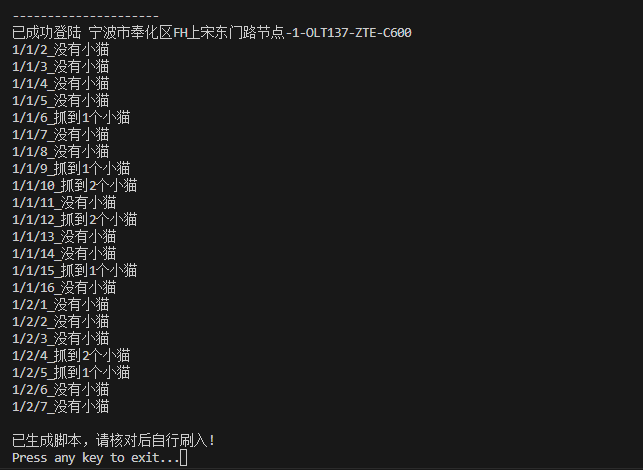
运行

alt text

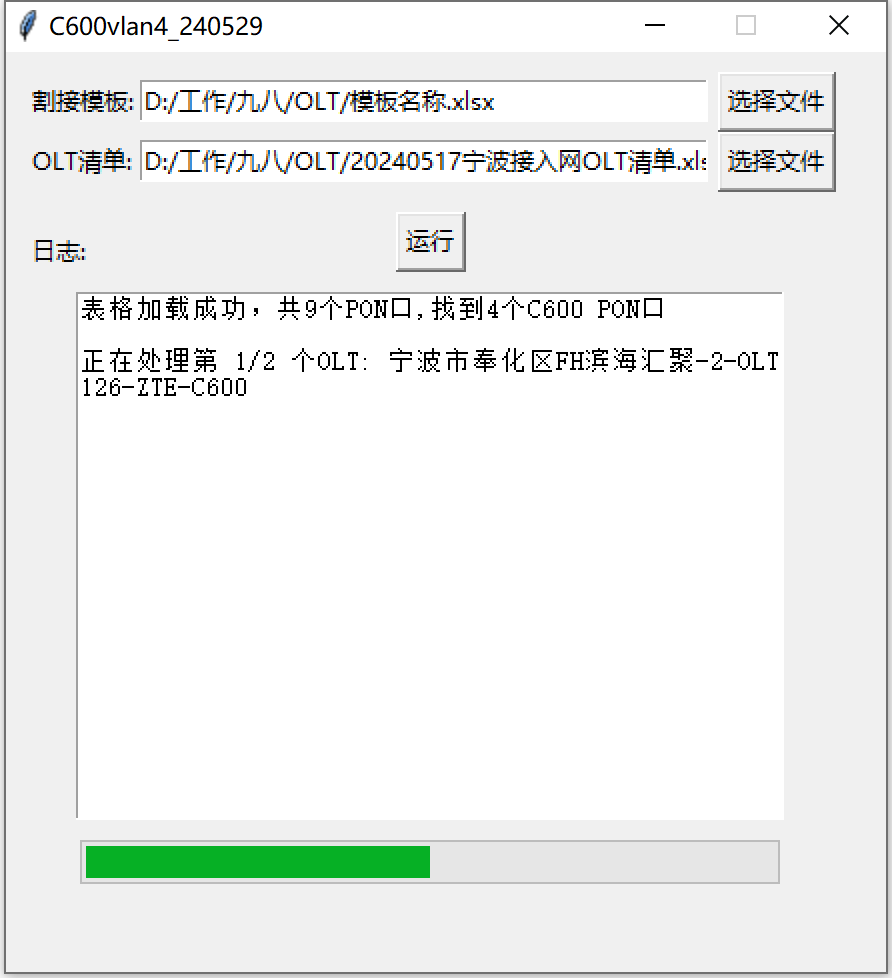
加上ui界面打包exe

alt text

相关文件

https://wwi.lanzoup.com/b0izos0zg 密码:hpra

使用 Hugo 构建
主题 StackJimmy 设计